11 November 2026 · Twitter Ban Service · 17 min read
Report Google review flags: how to report a review on Google
To report Google review content, open the review in Google Maps or Search, tap the three-dot More icon, choose Report review and pick the policy reason it breaks. Anyone signed in can flag one. Owners can also track the report in the Reviews Management Tool and appeal once, and Google says evaluation typically takes several days.
Can I report a review on Google if I don't own the business?
Yes. Anyone signed in to a Google Account can flag a review on Maps or Search, and owners get two extra tools on top.
That surprises people. The flag on a review is not an owner privilege; it sits under the three-dot menu for every visitor, the same way a report button sits under any post on a social network. So the short answer to "can i report a review on google" is yes, whoever you are, as long as the review breaks one of Google's posted rules.
Twitter Ban Service is a reporting service for X accounts, and it has no special line into Google. This page exists because the questions are the same ones people ask about X: which button, what happens next, and does the other person find out. Reporting reviews on google follows that pattern, with one difference that matters. Google publishes a separate route for owners, and a separate form for one specific crime, review extortion. Each is covered below. What none of them does is let anyone delete a review; Google reads the flag and decides.
How to report a review on Google from Maps or Search
The consumer flag takes about thirty seconds, and it is the one button behind every "report google review" or "google report review" search. On a phone or computer, as of November 2026, here is how to report google reviews one at a time:
- Open the place in Google Maps, or search the business name and open its reviews panel in Search.
- Find the review and tap the More icon (three dots) beside it.
- Choose Report review.
- Pick the reason that fits, for example off topic, spam, conflict of interest, profanity, bullying or harassment, discrimination or hate speech, or personal information.
- Send the report.
That is how to flag a review on google, and it is the same answer to how to flag reviews on google in bulk: one review, one report. There is no batch flag for visitors. People who type how do i report a review on google, how to flag google review or simply report review google are all describing this menu.
The reason you pick does the heavy lifting. Google's prohibited and restricted content policy for Maps is the list a reviewer checks your flag against, so a "spam" label on a review that is really a conflict of interest makes the report weaker, not stronger. If you are asking how to flag a google review written by a rival business, conflict of interest is the reason built for it.
How to report a review to Google as the owner: the google review report tools
Owners have the same flag, plus two places with a paper trail. In the Business Profile, open Read reviews, then the report option next to the review. The Business Profile help page on reporting reviews also points owners to the Reviews Management Tool, where each google review report gets a status, which makes google review reporting traceable instead of a guess. Owners asking how do i report a google review on their own listing should start there, because the status screen is the record an appeal needs. The Twitter Ban Service guide on who can actually delete a Google review walks through that tool screen by screen, so here the focus stays on what the flag sets in motion.
What happens when you report a review on Google, from flag to decision?
A person or an automated system compares the review against Google's policy, and the review either stays up or comes down.
So what happens when you report a review on google is a policy check, not a vote. For a visitor, that is all you learn. Google does not send a visitor a decision notice, so the only sign is whether the review is still there a few days later. Owners who file through the Reviews Management Tool see more. Its status reads Decision pending, Report reviewed - no policy violation, or Escalated - check your email for updates, and Google's help page says evaluation typically takes several days.
A "no violation" result is not the end. The tool allows one appeal per report, with a short explanation and any proof you hold. Use it when you have something new: a booking system with no record of the reviewer, a screenshot that links the account to a competitor, or the date the reviewer threatened you. Filing the same flag ten times adds nothing.
And what happens when you report fake reviews on google? The same thing, with more scrutiny on patterns. Google's systems look at the account behind the review, its history and its timing, not only the words. That makes fake reviews easier to catch in clusters than one at a time, which the companion page on what Google counts as a fake review covers in detail.
X runs a similar review loop. The guide to what each X report notification means shows how much more a reporter is told there.
If I report a Google review, will they know?
No. Google's help pages describe no step that tells a reviewer who flagged their review, and the report form carries no name to pass on.
If Google removes it, the author may notice the review is gone or now shows only to them. They will not see "flagged by" anything. That anonymity holds for owners too, though common sense limits it: if an owner argues with a reviewer in a public reply and the review vanishes the next day, the reviewer can guess. So the honest answer to "if i report a google review will they know" is that Google doesn't tell them, but your own behavior can. Knowing how to report a google review quietly mostly means flagging first and saving the public argument for never.
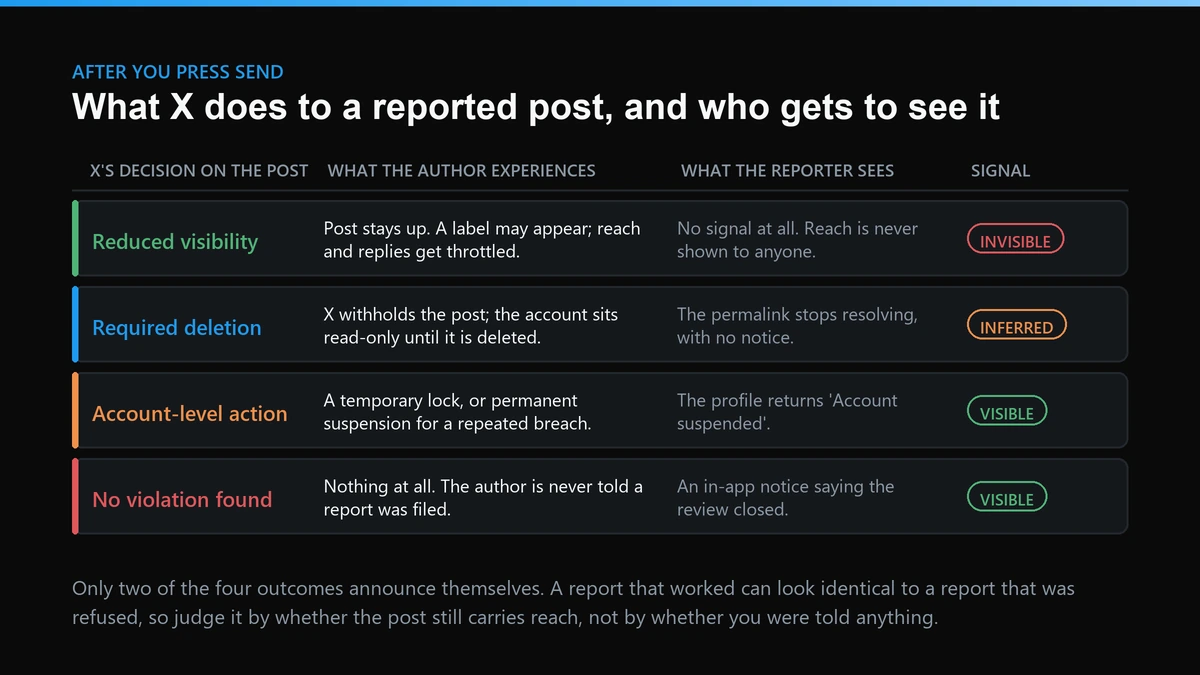
The same question comes up on every platform, and the answers differ in small ways. Compare whether TikTok tells someone you reported them, the YouTube version of that question, how anonymous a Facebook post report is, and what a WhatsApp report does to the other person. For the account side on X, what lands on an account reported on X shows the view from the other end.
How to report fake reviews on Google when the pattern matters
Report each suspect review with the reason that fits, then build the case around the pattern rather than any single post.
A request to report fake google reviews lands better with context, and the same goes for any fake google reviews report filed by a visitor. Before you flag, note the dates the reviews arrived, the reviewer names, whether any match a customer record, and whether the same profiles praised a competitor the same week. Then report a fake google review one at a time under the closest reason, and save the list for the appeal. That is how to report fake reviews on google without the flags reading as noise, and the steps for how to report a fake review on google are no different from any other flag. Reporting fake google reviews in this order also gives Google report fake reviews checks the timing data they rely on.
Can you report a business for fake google reviews it bought for itself? Yes, as a visitor you can flag each glowing review that reads as fake engagement, and Google's Business Profile policy says a profile caught gaining fake reviews can lose the ability to receive new ones and show a public warning. Google has also published scale figures: its Maps team said it blocked or removed more than 170 million policy-violating reviews in 2023 (Google, February 2024).
When people report fake reviews google style on several platforms at once, the same actors often turn up with fake profiles elsewhere. The signs that give away a fake X profile and the steps to report a fake TikTok account use the same evidence habits.
How do you report negative review extortion scams on a Google Business Profile?
Use Google's dedicated merchant extortion form, not only the normal flag, when someone demands money or favors to stop or remove reviews.
The scam usually runs in three beats. A wave of one-star reviews arrives on a profile with no real customer behind them. A message follows by email, text or a messaging app offering to make them stop for a payment, often in gift cards or crypto. Then the threat repeats with a deadline. Searchers looking for "report negative review extortion scams google business profile help" land on this page: Google's help article, report negative review extortion scams on your Business Profile, tells owners to file through the merchant extortion report form and says the form is only for owners who were directly subjected to such a demand.
What to send: direct links to every review in the attack, the date the spike started, the date the demand arrived, and screenshots of the messages. Do not pay and do not negotiate. Google's tips say not to engage with the scammer at all.
Extortion is also a crime. In the United States, the FBI's Internet Crime Complaint Center takes online extortion reports, and local police can open a file. If the threats arrive on X, the page on how blackmail scams run on Facebook and X sets out the parallel report path.
Can you report a bad Google review just because it is negative?
You can press the button, but Google keeps a review that is a genuine, on-topic opinion, however harsh it reads.
Can you report a bad google review that is unfair? Only the rule-breaking parts count. A real customer saying the wait was long, the food was cold or the refund took three weeks is the content reviews exist for. Google's help page asks owners not to report reviews they simply disagree with, and a run of baseless flags does nothing except slow down the reports that do matter.
Twitter Ban Service gives the same advice for harsh posts on X: the stronger move is a short public reply with facts and a way to reach you offline. Readers see a calm owner, and a later, legitimate report reads as credible.
Where the review states a false fact rather than an opinion, such as a crime that never happened, the route changes to Google's legal removal request. How defamation claims work on X covers the same opinion-versus-false-fact line on another host.
What Twitter Ban Service declines, and why volume never helps
Twitter Ban Service does not file, flag or appeal Google reviews for anyone, and it does not sell mass flagging on any platform.
Some sellers promise to "remove" reviews by sending hundreds of reports from many accounts. Google judges a review against its policy, so a pile of flags on a rule-abiding review changes nothing, and accounts used for coordinated false reporting risk losing their own privileges. The same holds on X and YouTube; the breakdown of why a YouTube mass report bot fails human flag review and what Snapchat's review actually counts explain the mechanics.
What we decline, in plain terms: reports against honest reviews or critics, fake accounts, report bots, any request for your Google or X password or 2FA code, and any promise of a guaranteed outcome. Twitter Ban Service's scope is X: if the people behind a review attack also run impersonation, scam or harassment accounts there, those accounts can be checked against the X Rules and genuine violations filed through X's official channels. X makes the final decision, never us.
For the X side, start with a full guide to reporting on X, reporting the same person on TikTok and X, the Snapchat-and-X report pairing, reporting a banned user who came back on X, and how X decides to suspend an account.
Which report route fits which problem?
Match the problem to the tool before you click, because the wrong form wastes a week. Every google reviews report, from a single flag to the extortion form, fits one of these four rows, and Twitter Ban Service uses the same sorting habit for X reports before anything is filed. Google report reviews tools are free and need no outside help; the only cost is the time it takes to gather evidence first. For anyone who wants to report fake reviews on google or report google reviews that cross a legal line, pick the row, collect the links and dates, and file once. Repeating a flag on the same review never moves it up a queue, and Google has no paid fast lane for review reports.
| Problem | Route | Who can use it |
|---|---|---|
| Spam, off-topic, hate or personal details in a review | More, then Report review, on Maps or Search | Anyone signed in |
| Need a status and an appeal | Reviews Management Tool | Verified owner |
| Pay-or-we-post demands | Merchant extortion report form | Owner who received the demand |
| False statement of fact, privacy or copyright | Google legal removal request | Affected person or rights holder |
Other platforms split their forms the same way. See the report routes for a Facebook ad scam, reporting a scammer on Facebook, a Facebook impersonation report, reporting harassment on Facebook, what a Facebook post report triggers, flagging a Marketplace seller, reporting a YouTube ad, and reporting a WhatsApp number.
FAQ
How do I report a Google review from my phone?
Open the review in the Google Maps app, tap the three-dot More icon next to it, choose Report review, pick the reason and send it. That is the whole answer to how do i report a google review, or how do i report a review on google, on Android or iPhone, and the same menu appears when you open a business's reviews in the Google app or mobile Search. You need to be signed in. A google report review flag from a phone carries the same weight as one from a computer, and how to flag a review on google is identical on both. Choose the reason with care. If the review names a private phone number, pick personal information; if it is a competitor praising itself or attacking you, pick conflict of interest. One accurate flag per review is enough when reporting reviews on google, and owners who want a status screen and an appeal should file the same report again through the Reviews Management Tool on a computer.
What does Google do after a fake review is flagged?
Google checks each flagged review against its fake engagement rules, looking at the account, its history and its timing, and removes the review only if it breaks policy. That is what happens when you report fake reviews on google, and broadly what happens when you report a review on google of any kind, whether you are a visitor or the owner. Visitors get no decision notice; owners using the Reviews Management Tool see Decision pending, a no-violation result, or an escalation to email. Google's help page says evaluation typically takes several days. Fake reviews are easier to confirm in groups, so reporting fake google reviews works best, and the reason to report fake google reviews as a group, when you flag every review in a cluster and keep a list of dates and names for the one appeal the tool allows. Google said in February 2024 that it blocked or removed more than 170 million policy-violating reviews in 2023, most of them before publication. The flags you send fill the gaps its filters miss.
How to report a fake review on Google that a competitor wrote?
Flag it with the conflict of interest reason, because that label exists for reviews posted by rivals, former staff or the owner's own circle. That is how to report a fake review on google when you know or strongly suspect who is behind it. Click More beside the review, choose Report review, then the conflict reason, and send. Owners should also file it through the Reviews Management Tool, so a refusal can be appealed with evidence: a matching profile photo, the same wording used on the competitor's own listing, or messages that tie the account to them. Google report fake reviews flags never reveal your name to the reviewer. The same applies if you report a business for fake google reviews it posted about itself. Avoid naming the competitor in a public reply, since an accusation you cannot prove reads badly to customers and can create a legal problem of its own. If the attack includes false claims of crimes, the legal removal request may fit better than a policy flag, and a lawyer can advise on it.
Is there a way to report fake reviews on Google in bulk?
Not for visitors. Each fake google reviews report covers a single review, so a cluster of forty reviews means forty flags. Owners get a partial shortcut: after a refusal, the Reviews Management Tool lets them select up to 10 eligible reviews in one appeal, according to Google's Business Profile help page. That is the closest thing to bulk handling Google offers. To report fake reviews on google efficiently, and that is really how to report fake reviews on google at any scale, sort them first. Put the reviews that share wording, posting dates or new accounts in one group, label each with the same reason, and keep a short evidence note you can paste into the appeal. Beware anyone selling a service to report fake reviews google style in bulk from many accounts. Google judges content against policy, not report counts, and coordinated false flags can cost those accounts their own privileges. Twitter Ban Service does not offer Google flagging of any kind.
Can I report a Google review that threatens me or shares my address?
Yes, and it should be one of the first reports you send. Google's Maps content policy bans harassment, threats and the sharing of personal information such as home addresses or phone numbers, so pick the matching reason when you report google reviews of this kind. The steps match any other flag: More, Report review, reason, send. A real threat of harm, though, belongs with the police first, with screenshots saved before the review disappears. Owners can follow up through the Reviews Management Tool and, where personal details are exposed, through Google's legal and privacy forms, which handle doxxing more directly than the review flag. Keep copies of everything with dates. If the same person is threatening you on X, that conduct falls under X's violent speech and private information rules, and the X report path is separate from Google's; a report on one platform does nothing on the other.
How to report Google reviews that ask for money to stop? (report negative review extortion scams google business profile help)
Use Google's merchant extortion report form. That is how to report google reviews tied to a pay-or-we-post demand, and Google built it for owners who received the demand directly. The page that comes up when you search report negative review extortion scams google business profile help asks for links to every review in the attack, the date the spike began, the date of the demand and screenshots of the messages. Also flag each review through the normal Report review option, since the extortion form and the review flag are separate records. Do not pay, do not reply to the scammer, and do not post angry owner responses while the case is open. Google's tips say not to engage. Report the demand to the police as well; in the United States the FBI's Internet Crime Complaint Center accepts online extortion reports. Paying rarely ends it, because a payment marks the profile as a target. Google review reporting through the proper form leaves a record that later reports can point to.
How to flag a Google review again after Google says no violation?
Do not re-flag it; appeal it once through the Reviews Management Tool with new information. The appeal is the only second look Google offers on a refused report, and how to flag google review content a second time comes down to that single step. Open the tool, find the report marked as reviewed with no policy violation, choose appeal, and explain in a few plain sentences which rule the review breaks and why. Attach what you did not have the first time: proof that no booking or purchase matches the reviewer, a link to the same text on a rival's listing, or the dates of a threatening message. Repeating the original flag from Maps adds nothing, because the same review is checked against the same policy. If the appeal also fails, the review stays unless it breaks the law, in which case Google's legal removal request is the remaining route. Report review google flags cannot change that decision, and neither can any outside service. Google report reviews tools have a single appeal and no second one.
If I report a Google review, will they know, and can I report a review on Google as a non-customer?
No, Google does not tell the author who flagged their review, so if i report a google review will they know has a reassuring answer. And yes, can i report a review on google applies to anyone signed in, customer or not. The author might notice the review vanished or now shows only to them, but nothing names the reporter. That makes it reasonable to report a fake google review you spotted on a friend's listing, or to use how to report a review to google steps on a place you never visited, provided the review breaks a policy. How to report a google review stays the same either way: More, Report review, reason, send. Can you report a bad google review just for being harsh? You can press the button, but Google keeps genuine opinions, so the flag will not stick. How to flag reviews on google well comes down to choosing the right reason. Twitter Ban Service offers no Google flagging; this answer describes Google's own public tools so you can use them yourself.