8 November 2026 · Twitter Ban Service · 11 min read
How to report a Facebook ad, and where scam ads on Facebook go next
Here is how to report a Facebook ad: open the menu in the ad's top corner, choose the report option and pick the reason that fits, such as a scam. Meta checks the report against its Advertising Policies, not against how many people complained. If the ad took money, also tell your bank and a fraud agency such as the FTC, IC3 or Action Fraud.
Three reports usually beat one here. The ad itself, the advertiser behind it, and, if you paid, the money trail. Most guides stop at the first. This page covers all three, and it is honest about why scam ads on Facebook are not removed as often as people expect.
How do you report an ad on Facebook, step by step?
You report an ad from the menu in its top corner. That is how to report a Facebook ad, and how to report an ad on Facebook, on any device. Meta's About Facebook ads help page names that options menu, lists "Report an ad" among the feedback you can give, and says reports are checked against the Advertising Policies. It does not print every tap, and Meta changes menu wording between app versions, so the steps below use only the labels that page confirms.
- Screenshot the ad first. Capture the advertiser name, the text, and the link it promotes. Ads rotate, and once one leaves your feed it is hard to find again.
- Open the ad's menu. It sits in the top corner of the ad, the same place as "Why am I seeing this ad?".
- Choose the report option and pick the reason closest to the problem. For fraud, that is the scam or misleading reason.
- Submit, then hide the advertiser if you never want its ads again. Hiding and reporting are separate actions.
How to report an ad on Facebook app and on a computer is the same flow; only the position of the menu shifts slightly on a phone screen.
Which reason fits when you report scam ads on Facebook?
Pick the scam or misleading reason. To report scam ads on Facebook well, use it whenever the ad tries to take money, a login or personal details under a false story. If you wondered how do I report a scam ad on Facebook that uses a celebrity, this is the reason. It covers fake celebrity investment ads, too-good-to-be-true shop discounts and "recover your account" offers. To report fake ad on Facebook for a brand that does not exist, the same reason applies, and the comment box, when one appears, is where you say what is false.
Report advertising fraud on Facebook with something a reviewer can check in one look. Name the real person or company being copied and paste its official site. Quote the impossible promise word for word. Note whether the landing page asks for card details. A reviewer reading "this is fake" learns nothing; a reviewer reading "the ad uses a news anchor who has publicly denied any link, and the site asks for a $250 deposit" has a policy breach in front of them.
That is also how to report scam ad on Facebook listings for shops that never ship. Ads that are offensive but not fraud take a different reason. Mixing the two slows things down, so choose the one that fits.
How to report a Facebook advertiser, not just one ad
Every Facebook ad runs from a Page, so how to report a Facebook advertiser means reporting that Page. Tap the advertiser name on the ad to open its Page, then use the Page's own menu to report it. Scam advertisers often run dozens of near-identical ads from one Page, and a Page report puts the whole account in front of a reviewer instead of a single creative.
The Meta Ad Library helps here. Search the Page name and you see every active ad it runs, with start dates. A Page created last week, running forty ads with different celebrity faces, tells its own story; screenshot that list. If the Page impersonates a real business, that business can file an impersonation report too, which carries more weight than a stranger's. For the impersonation side, reporting a whole Instagram account or Page shows how Meta separates account reports from content reports, and who may file a trademark report on Instagram covers a brand owner's own route.
How to report Facebook ads scam to police and fraud agencies
If the ad took money or data, a report to Meta is not enough, because Meta removes ads and does not refund you or pursue the scammer. Knowing how to report fraudulent Facebook ads outside Facebook matters more than the in-app button once money has moved. Call your bank or card issuer the same day, since card disputes and fraud claims run against deadlines, and ask whether the payment can be stopped or recalled. Then file with the fraud agency for your country, attaching the ad screenshots, the advertiser's Page link, the landing page address and every payment record, in date order. Twitter Ban Service does not file these reports on anyone's behalf, and no outside service can; agencies want to hear from the victim directly, and they may contact you for more detail. Keep the reference number each agency gives you, because your bank will ask for it.
| Where you live | Fraud report route | What to attach |
|---|---|---|
| United States | FTC ReportFraud, and FBI IC3 for online losses | Ad screenshots, Page link, payment receipts |
| England, Wales, Northern Ireland | Action Fraud | Same, plus bank reference number |
| Elsewhere | Local police or national consumer agency | Same; ask for a crime reference |
How to report Facebook ads scam to police comes down to that table: the agency logs the crime and can link your case to others run by the same group. A police reference number also helps a bank dispute.
Why does Facebook allow scam ads, and why are they not removed?
Scam ads on Facebook are not removed reliably because review is automated, scammers replace banned accounts fast, and, according to internal documents, the money matters. In November 2025 Reuters reported, citing internal Meta documents, that Meta estimated about 10.1% of its 2024 revenue, roughly $16 billion, came from ads for scams and banned goods, and that it banned advertisers only when systems were 95% sure of fraud (summary of the Reuters report). Meta called the estimate "rough and overly-inclusive" and said it had removed more than 134 million scam ads. Twitter Ban Service has no way to change that threshold or see inside Meta's review, and neither does any outside seller who claims otherwise.
So the honest answer to why does Facebook allow scam ads: it does not allow them on paper, but enforcement leaves gaps. A report still matters, because it adds a human-reviewed signal to an advertiser the system had scored below that threshold.
What people say about reporting Facebook scam ads on Reddit
Searches for how to report Facebook ads scam reddit usually lead to threads of people saying the same thing: they reported an obvious scam ad and got a reply that it does not go against the standards. That pattern is common enough to take seriously, and it matches the threshold described above. Threads also point to the same practical fixes this page gives: report the Page as well as the ad, use the impersonation route when a real person is copied, and go to the bank and a fraud agency when money moved. Some users add that reporting from the Page, not just the ad, finally got a removal, while others never heard back at all. Reddit posts are anecdotes, not data, and nothing here quotes a specific thread; treat them as a warning about likely outcomes, not as instructions. If you want to know how to complain about scam ads on Facebook in a way that leaves a record, the bank and agency reports above are that record.
What Twitter Ban Service does and declines
Twitter Ban Service works only on X, so the Facebook report, the Page report and the fraud filing above are steps you take yourself; nobody outside Meta can speed a Meta review. Where the scam continues on X, the case is handled this way: you send the X profile and your evidence, the account is checked against the X Rules on scams and impersonation, and a report goes through X's own channels only if a rule is broken. X decides. The service declines accounts that break no rule, requests to report a competitor or critic, mass or false reporting, and any request for a password or 2FA code. If the scam reached you through Instagram, reporting a scammer on Instagram and what to save before reporting sextortion on Instagram cover those threads. If you reported the wrong thing by mistake, whether a report can be undone on Instagram explains what Meta lets you cancel.
A few scam ads sell X handles or "verified" usernames. Real handle trades follow X's rules; what buying a Twitter handle actually involves and how handle marketplaces work and where they fail show the warning signs. Ads that offer "X support" are fake by default; the contact routes X publishes for customer service are the only real ones. An ad promising to lift a "rate limit exceeded" error on Twitter for a fee is selling a fix that usually needs only time. And an ad offering to delete anyone's account on demand is a scam in itself, as the limits on deleting someone else's Instagram or X account explain.
FAQ
How do I report a scam ad on Facebook from my phone?
The steps for how to report an ad on Facebook app and desktop are the same: open the menu in the ad's top corner, choose the report option and pick the scam or misleading reason. That is the whole in-app flow, and it is the same on Android and iPhone. Screenshot the advertiser name and link first. If the ad copied a real person or brand, mention that in the comment box when one appears, since a named impersonation is easier for a reviewer to confirm than a general complaint. People searching how to report scam ad on Facebook often miss the next step: tap the advertiser name and report its Page as well. Meta reviews each report against its Advertising Policies, so one accurate report counts for more than a crowd of vague ones. Twitter Ban Service does not file Facebook reports for anyone; these steps are yours to take, and they take about a minute.
How do I complain about scam ads on Facebook if the report was rejected?
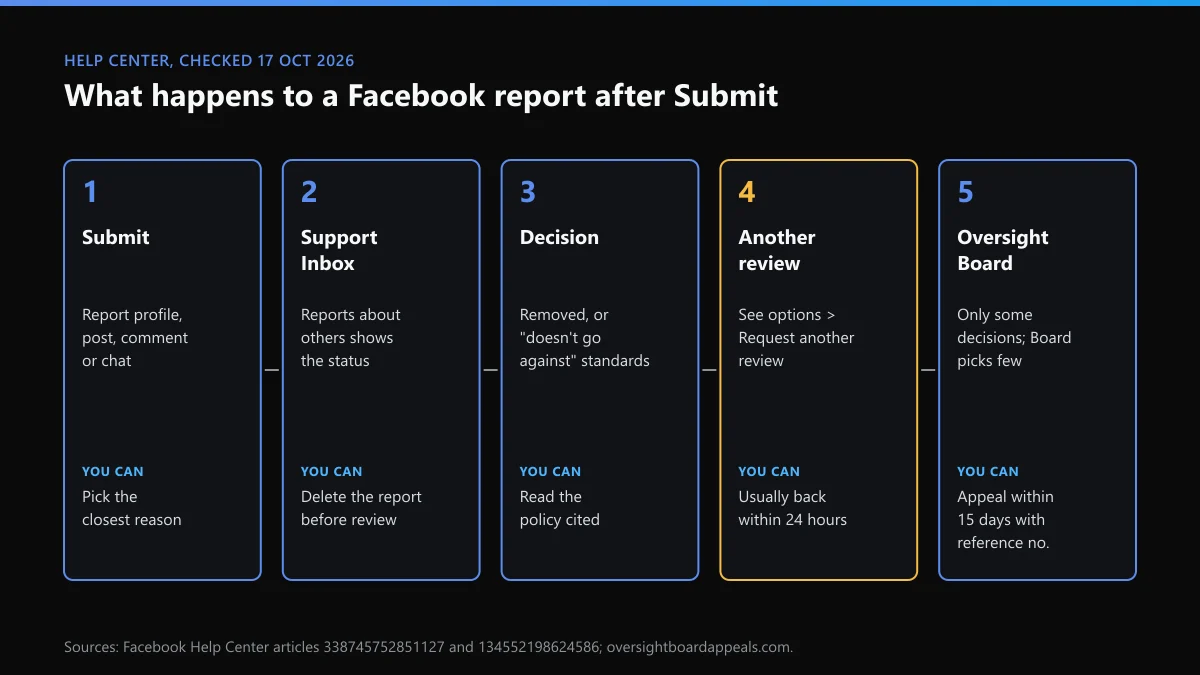
A rejected ad report is not the end. How to complain about scam ads on Facebook after a refusal: start with the Support Inbox, where Meta shows the status of reports you made about others, and check whether it offers another review. Next, report the advertiser's Page rather than the single ad, since a Page running many copies of the same scam is easier to judge as a whole. If a real business or person is being copied, ask them to file an impersonation report, which Meta weighs more heavily because it comes from the rights holder. Users in the European Union can also use the notice and appeal rights the Digital Services Act gives them. Finally, if you lost money, file with your bank and a fraud agency; those reports exist outside Meta's decision and can still lead somewhere even when the ad stays live for a while.
Can I report fake ads on Facebook anonymously?
Yes, as far as the advertiser is concerned. When you report fake ad on Facebook content, Facebook does not tell the person or Page you reported who made the report, and an ad report is reviewed against the Advertising Policies without your name being passed on. Meta itself does know which account sent it, because you must be logged in to use the menu on the ad. That is also why the result appears in your Support Inbox. If you are worried about retaliation from a scammer, the bigger risk is usually contact you start yourself: commenting on the ad, messaging the Page or clicking through to a chat. Report quietly, block the Page, and keep screenshots. When you go on to file a fraud report with the FTC, IC3, Action Fraud or the police, you will normally give your name, because those agencies need a victim or witness they can contact.
How to report Facebook ads scam to police, and how to report fraudulent Facebook ads?
Go to the police when you lost money, gave card details or handed over identity documents, and report advertising fraud on Facebook itself as well. In the United States, use the FTC's ReportFraud site and the FBI's IC3 for online losses. In England, Wales and Northern Ireland, use Action Fraud. Elsewhere, contact local police or your national consumer protection body. Bring the ad screenshots, the advertiser's Page link, the landing page address, every receipt or transfer record and a short timeline. Call your bank first if money moved, because card disputes and fraud claims have deadlines, and many banks ask for a police or agency reference. The police will rarely chase a single small loss alone, but your report joins others tied to the same group, and that is how larger cases get built. Meta's own review does not replace this step, since Meta removes ads and does not return money.
Does reporting an ad on Facebook many times get it removed faster?
No. Meta checks each ad report against its Advertising Policies, so the number of reports is not what decides the outcome. Twenty people choosing the wrong reason do less than one person choosing the scam reason and naming the impersonated brand. Asking friends to pile reports onto an ad they never saw adds noise, and organised false reporting can itself break Meta's rules. What does help is a precise report: the right reason, a quoted false claim, the real company's official site, and a separate report on the advertiser's Page. If you are asking how to report a Facebook advertiser rather than an ad, open its Page and report that. Report each copy you actually see. The same principle holds on X, where Twitter Ban Service declines mass reporting and only takes cases with a specific rule breach, because volume without a violation goes nowhere and can put the reporter's own account at risk.
Why do scam ads on Facebook keep coming back after I report them?
When scam ads on Facebook are not removed or keep returning, it is usually because the scammer opens a new advertiser account or Page and runs the same creative again. Meta removes the ads and accounts it judges to break the rules, and the people behind them return under new names, often with a different celebrity photo on the same fake investment site. Reuters reported in November 2025, citing internal Meta documents, that Meta banned advertisers only when its systems were 95% sure of fraud, which leaves room for borderline accounts to keep running. Meta disputed the wider estimates. Ask why does Facebook allow scam ads and that gap is the answer; threads found by searching how to report Facebook ads scam reddit describe the same cycle. Report each copy you see and hide the advertiser. Each report on a fresh account is a fresh chance for removal, which is why one accurate report per sighting still beats ignoring the ad.