10 November 2026 · Twitter Ban Service · 16 min read
The outdated content removal tool: how Google refreshes dead links and stale snippets
Google's outdated content removal tool, officially called Refresh Outdated Content, lets someone who does not own a site ask Google to drop or update a search result once the page is gone or has changed. Google compares the live URL with the old snippet. Search Console Help says an approved request removes a dead page from results, but nothing still on the live page.
Myth first: can the outdated content removal tool delete anything Google shows?
No. The tool only refreshes Google's copy of a page that has already disappeared or changed on the web.
That is the most common misreading of Google's outdated content removal tool. People expect a delete button for search results and find a form that checks facts against the live page. Google's own Refresh Outdated Content help page lists two conditions that must both be true: you do not own the page, and the page or image no longer exists or is significantly different from what Google stored. If the words you want gone are still on the live page, the request fails, and the help page says so in as many words.
Twitter Ban Service handles X accounts that break the X Rules, so this page matters to us for a narrow reason: deleted posts and suspended profiles often keep a ghost result in Google for days or weeks. Removal of outdated content is the honest fix for that ghost. It is not a fix for a post that still sits on x.com, and the sections below show which route fits each case.
How does the Refresh Outdated Content tool work, step by step?
You paste a URL, Google fetches it, and the answer depends on what the crawler finds there now. Here is the flow Google describes, as of November 2026:
- Sign in to any Google account. Google requires this to prevent abuse; you do not need Search Console ownership.
- Open the refresh outdated content tool (the page sits at search.google.com/search-console/remove-outdated-content) and select Request refresh or New request.
- On the Page tab, enter the exact URL shown in the result. For an image, choose Image and paste both the image's copied link address and the search results URL.
- Select Submit. If the page still loads, Google asks for 1-2 words that appeared in the old snippet but are no longer on the live page.
- Watch the request queue at the bottom of the tool. Statuses are Pending, Approved, Denied, Expired and Cancelled.
An approved request on a dead URL removes the result. On a changed page, Google removes the stale snippet and rewrites it at the next crawl, so the page itself can still rank in the meantime. Google outdated content removal, in other words, edits google remove outdated content tool search results entries and nothing else. That is the whole of how the google remove outdated content tool works; there is no appeal form and no human you can email about a single request.
Which Google addresses are the official tool, URL and help pages?
Only two domains matter: search.google.com for the form and support.google.com for the instructions.
Search wording varies a lot. A google remove outdated content tool official query, a google search remove outdated content tool official query and a google search console remove outdated content tool official query all point at one form, and the google search remove outdated content tool url is the search.google.com address above. The google outdated content removal tool official instructions come in two versions. The google remove outdated content tool help page in Search Console Help is the detailed one, with denial reasons and statuses. The google remove outdated content tool support page in Search Help is the short version for everyday users. Both describe the google remove outdated content official tool the same way, and for google remove outdated content search results official wording, quote those pages rather than a blog summary.
That is also where google remove outdated content tool how to steps, google remove outdated content tool how it works detail and google remove outdated content tool refresh outdated content labels stay current. Third-party guides copy screenshots that age within months. Twitter Ban Service links only to those Google pages for this reason. A request to google delete outdated content filed through any site other than search.google.com is not a Google request at all.
Dead link, changed page or live content: which Google route fits?
Pick the route by checking what the URL returns today, not by how much the result bothers you. The table maps the searches people type to the tool Google actually offers.
| What you see | Typical search | Google route |
|---|---|---|
| Result opens a 404 or 410 page | remove dead link from google, remove 404 pages from google | Refresh Outdated Content, page request |
| Page changed, old text still in the snippet | google refresh outdated content tool | Refresh Outdated Content with 1-2 removed words |
| Old image still in Google Images | google remove outdated content from search results tool | Refresh Outdated Content, image request |
| You own the site and need it hidden now | google search console remove outdated content | Search Console Removals tool, about six months |
| Live page shows your phone, address or ID | delete outdated content google | Personal information removal request |
| Live page breaks a law, such as defamation or copyright | google remove outdated content official | Legal removal request to Google, plus the host |
The last two rows are where most frustrated searchers belong. Google's personal information removal page covers contact details, government IDs, financial numbers and doxxing, and it states that Google can only remove things from Google Search, not from the host site.
Why does a deleted X post or suspended account still show in Google?
Google shows the version it last crawled until Googlebot visits that URL again.
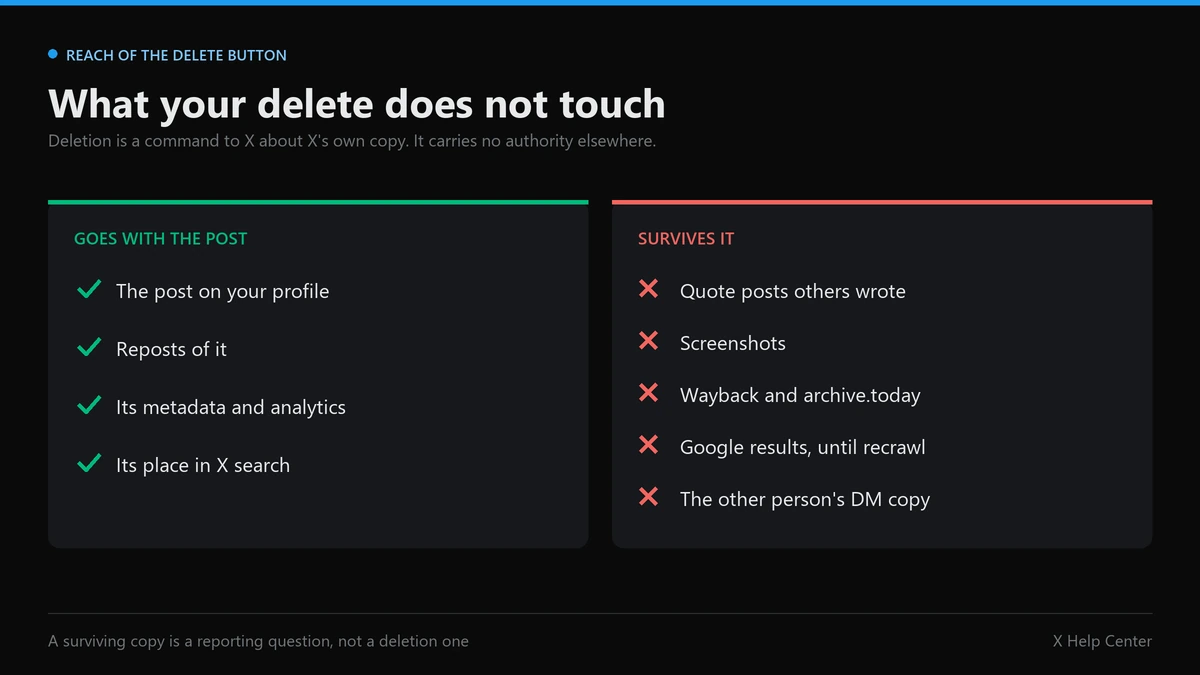
On X this happens daily. A user deletes a post, or X suspends an account, and the profile URL starts showing a notice instead of the old content. Google's index has not caught up, so the result still shows the old name, bio line or post text in its snippet. This is the case the tool was built for. Submit the exact x.com status URL or profile URL that appears in the result; if Google sees the page has changed, the request asks for words from the old snippet that are no longer there.
Two limits. X pages are rendered by script, so a deleted post may show a notice instead of a plain 404, in which case Google treats it as changed rather than gone. And other accounts' quote posts and screenshots live on their own URLs, which this tool cannot touch while they are live. Those need an X report if they break the rules. Twitter Ban Service reviews whether they do, for example through how X decides to suspend accounts or reporting a suspended user who returns on a new handle.
Removals tool vs outdated content tool: what changes when you own the site?
Owners get a faster, broader tool, but it is temporary by design.
The Search Console Removals tool works only on a property you have verified. Its Temporary Removals tab offers Temporarily remove URL or Clear snippet in search. Google says a request usually takes up to a day to process, is not guaranteed, and lasts about six months (180 days). To make it permanent, the owner must delete or update the content so the server returns 404 or 410, put it behind a password, or add a noindex tag. Google tells owners not to rely on robots.txt for this.
So a site owner searching google search console remove outdated content tool usually wants Removals, while a non-owner wants the refresh tool. Search Console Help draws the same line: Removals is for pages that still exist, and you must own the property; Refresh Outdated Content is for pages that are gone or updated, and you do not need to own the website. If a third party filed a refresh request against your pages, the Removals tool's history tab shows it.
How long does it take Google to remove outdated content?
Google gives no fixed deadline, only status labels and rough ranges.
- Refresh request: Google's Search Console Help says processing "can take a few days".
- Owner's temporary removal: usually up to a day, according to the same help center.
- Plain 404 pages: no request needed. Google says old URLs that return 404 drop out naturally as it recrawls them, so owners do not need an urgent update for cruft.
- Expiry: an approved refresh expires after 180 days or when the URL no longer exists. If the page comes back with the same content, it can return to results.
If an approved result still appears, Google's advice is to compare the URL in the result with the one you sent, capitalization included. Mobile links, tracking parameters and old twitter.com addresses each count as a separate URL in Google's eyes, so removing dead links from google often means one request per variant.
How to remove dead links from Google search without owning the site
If you are asking how to remove a dead link from google, or how to remove dead links from google in a batch, the method is the same page request repeated per URL. A google remove dead link filing and a google remove broken link filing are identical in the form; Google only checks that the URL now fails or has changed. To remove dead links from google search results faster, list every variant first. That is the practical answer to how to remove dead links from google search, and to google remove dead links queries that turn out to involve ten slightly different addresses.
Site owners have it easier, and Twitter Ban Service does not file requests on domains it does not control. To remove broken link google entries on your own domain, or to remove broken links from google after a redesign, return a real 404 or 410 and let Googlebot recrawl; use Removals only when something sensitive must vanish now. How to remove old urls from google search results on a moved site is a redirect job, not a removal job.
What about cached pages and broken links that still rank?
Google no longer offers cached copies, so there is no separate cache to clear.
Google's robots meta tag documentation now says the noarchive rule is no longer used because the cached link feature no longer exists. Older guides on how to remove cached pages from google describe a step that has gone, and there is no google remove outdated content tool remove cached pages option to look for. What still goes stale is the snippet, the title and the thumbnail, and those are exactly what the refresh tool updates. A broken link in results is a dead page Google has not yet recrawled; asking google to remove broken link entries works through the same page request.
Where the problem is a live page rather than a stale copy, the platform's own report process comes first. That applies to defamatory posts on X, X copyright notices for leaked photos and clips, and accounts covered in signs that an X profile is a fake. Once the host removes the page, Google's tool finishes the cleanup. For background on outcomes, see how X bans differ from suspensions.
What does this tool, and our service, refuse to do?
It refuses live, unchanged pages, and it never removes anything from the web itself. Nor will it act because you think content is wrong or harmful. Those need a legal, policy or personal-information request.
Twitter Ban Service has its own limits. We do not file refresh requests to hide a live, rule-abiding post, we do not report accounts that follow the X Rules, and we never use bots or mass reports, which do not decide outcomes and can put the reporter at risk. We never ask for passwords or 2FA codes, and no one can promise Google or X will act. The same applies elsewhere: why mass reporting Facebook Pages and groups backfires, what a WhatsApp report sends to reviewers, YouTube flag review versus report bots and what Snapchat review actually counts explain why volume fails.
When the stale Google result comes from another platform
Search results for one person often point to several networks, and each host must remove its page before Google can refresh it. On Facebook, start with reporting a Facebook post or Page, Facebook post removal sorted by case type, libel posted on Facebook, Facebook blackmail and sextortion scams and a Facebook copyright claim filed alongside X. Whole accounts are covered in how a Facebook account belonging to someone else really gets removed and taking down a Facebook account and its X twin.
For YouTube, read getting a YouTube video taken down, how a YouTube copyright strike is issued and YouTube channel versus single-video takedowns. Snapchat has Snapchat account takedown routes and what it takes to get someone else's Snapchat account deleted. TikTok cases sit under the limits on deleting someone else's TikTok account and a TikTok account ban request, and WhatsApp under what a WhatsApp takedown can actually mean. When the source page is gone, return to Google's refresh outdated content help page and file the URL.
FAQ
Is the Refresh Outdated Content tool Google's official tool, and where is its help page?
Yes. The google remove outdated content official tool sits at search.google.com/search-console/remove-outdated-content, which is the full google search remove outdated content tool url, and it runs inside Search Console even though you need not own a site. The google outdated content removal tool official guidance lives in two places: the google remove outdated content tool support page in Search Help, titled Refresh outdated content, and a longer article in Search Console Help listing when to use it and when not to. Treat anything outside support.google.com as unofficial. Searches for google remove outdated content official pages, the google remove outdated content tool official form, a google search remove outdated content tool official link, the google remove outdated content tool help page or the google search console remove outdated content tool official entry all lead to the same form. No paid service controls this tool, and nobody needs your Google password to file; you sign in yourself. A fee to submit it buys something you can do in two minutes.
How do I remove a dead link from Google search results?
To remove dead link from google results, confirm the page really fails, then file a page request in the outdated content tool. Open it in a private window. If it shows a 404 or 410 page, or a notice that the post or account no longer exists, copy the exact URL from the result, capitalization included. Paste it on the Page tab and submit; that is google remove outdated content tool how to in one line. Google fetches it, finds nothing, and usually leaves the request Pending for a few days. That is how to remove a dead link from google, and how to remove dead links from google search at scale works the same way. A google remove dead link request covers one address, so removing dead links from google across many URLs means one request each. Google remove dead links requests suit non-owners; owners can simply let a 404 drop out on recrawl.
Can I use the tool for broken links or 404 pages on my own website?
You can, but Google points owners elsewhere. If you are the site owner trying to remove broken links from google, Search Console Help says outdated URLs that return 404 will drop out naturally as Google recrawls them, so a google remove broken link request is rarely needed for that kind of cruft. Owners who want to remove 404 pages from google faster, or who need to remove broken link google entries showing sensitive text, should use the Removals tool in a verified property; that is the google search console remove outdated content tool owners mean when they search google search console remove outdated content. It hides a URL for about six months while the 404 or noindex takes effect. Do not block the old pages in robots.txt: Google says that is not a removal method, and it can stop Googlebot from seeing that the page is gone. For a whole moved section, set up redirects instead, because the Removals tool will not move old URLs to new ones and can hide every version of a URL at once.
What happens after I submit a refresh outdated content tool request?
Your request joins a queue at the bottom of the form and moves through set statuses. Pending means Google is still processing, which Search Console Help says can take a few days. Approved means the change should be live: a dead page drops out, and a changed page loses its old snippet until the next crawl rewrites it. Denied comes with a link explaining why, often because the words you gave are still on the live page or the page has not changed. Expired means 180 days have passed since approval, or the URL no longer exists. Cancelled means you or a verified owner withdrew it. That cycle is how the google refresh outdated content tool handles each URL, which is google remove outdated content tool how it works, and the google remove outdated content tool refresh outdated content step touches google remove outdated content tool search results only. The removal of outdated content only affects Google Search; Bing keeps its own copies.
How do I remove old URLs from Google search results when the page still exists?
You usually cannot do it with the refresh tool. Google says that if the page still exists and the information you want removed is still there, the outdated content tool is not for you. How to remove old URLs from google search results then depends on who you are. The owner can delete the page so it returns 404 or 410, add noindex, or use the Removals tool for a six-month block. A non-owner has to ask the owner, or the platform hosting it, to remove the content first. If the live page shows your phone number, address, government ID or doxxing, Google's personal information removal request is the right form. For defamation, copyright or similar legal claims, Google runs a separate legal removal process. On X, a post that breaks the rules goes through X's reporting, and only after X removes it does Google's outdated content removal step make sense.
How long does it take Google to remove outdated content after approval?
An approved request usually takes effect quickly, but the wait before approval varies. Google's Search Console Help says processing can take a few days and gives no guaranteed deadline. Once approved, a dead page should disappear from Google Search results. For a changed page, Google removes the old snippet straight away, but the result can keep appearing with a blank or new description until Googlebot recrawls the URL. How long does it take google to remove outdated content in practice also depends on URL variants: if the result you still see differs from the one you sent, even by capitalization, a tracking parameter or the old twitter.com domain, Google treats it as another page. Google also says an approval expires after 180 days or when the URL stops existing, so a page that returns later with the same content can reappear. Recheck from a signed-out browser a week later before filing again in the google remove outdated content from search results tool.
Can I delete outdated content Google shows about me, or only hide it?
You can delete outdated content Google shows only in the sense of updating Google's copy; the page itself is controlled by whoever hosts it. Google's outdated content removal tool, the official name being Refresh Outdated Content, removes a result once the page is gone and rewrites a snippet once the page has changed. That is what most people mean by delete outdated content google requests. A google delete outdated content request cannot touch text that is still live, so Google sends those cases to the site owner, its personal information form, or a legal removal request. Google outdated content removal also leaves Bing, archives and screenshots alone. For X posts, the order matters: report a rule-breaking post to X first, wait for X to remove it, then file the URL with google's outdated content removal tool. Twitter Ban Service only acts where the X Rules are broken, and never asks for a login or a code.
Does Google still keep cached pages I need to remove?
No. Google's robots meta tag documentation now states that the cached link feature no longer exists, which is why the noarchive rule has no effect in Google Search. Advice on how to remove cached pages from google, or on a google remove outdated content tool remove cached pages option, describes a step that no longer applies. The Search Help article still mentions that a page description or cache might be outdated, but what you can fix today is the stored title, snippet and thumbnail. Those are what the tool updates when a page is gone or changed. Other archives are separate: the Wayback Machine and other snapshot sites keep their own copies, and Google has no control over them. If an archived copy shows private data, contact that archive directly. For google remove outdated content search results official guidance, the support.google.com page on refreshing outdated content remains the reference Google links from its personal information help.